


Published
On this page
Colour sets the mood of a website before anyone reads a word. The right palette depends on who you're selling to — and age is one of the biggest differences, partly down to taste and partly down to how eyes change over a lifetime.
Why colour matters
Colours carry associations. Fast food chains lean on red, orange and yellow because they read as energetic, warm and appetising. Hospitals and dentists use pale blues and greens because they feel calm and clean. Banks love dark blue because it reads as steady and trustworthy.
None of this is magic, and people's preferences vary. But a palette that suits the audience feels "right" without anyone noticing why, and one that doesn't makes a good business look like the wrong fit. One widely quoted survey by Joe Hallock found blue was the most popular colour in every age group he asked about, which is part of why so many websites default to it — and why a blue site has to work harder to stand out.
Children and families
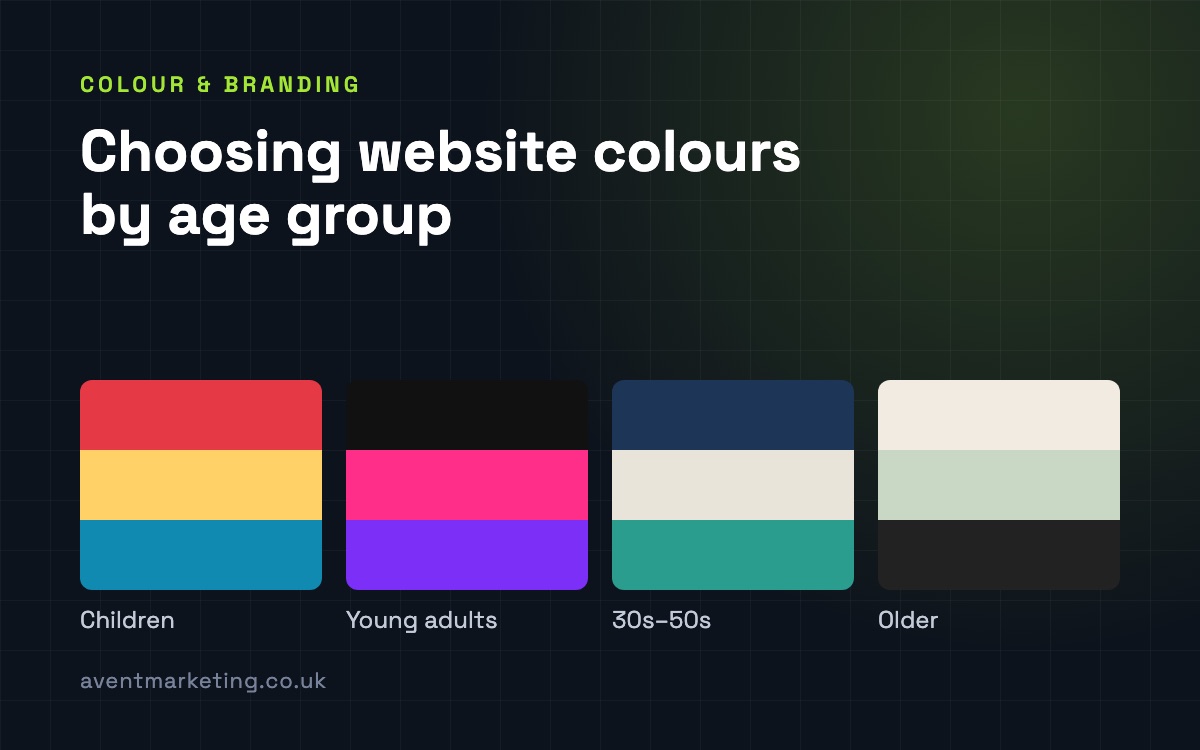
Bright, saturated primary colours — red, yellow, blue, green — with plenty of contrast between them. Think nurseries, soft play, toy shops, kids' parties. Energy and fun are the point.
But remember who's actually buying. A site for children's parties is read by parents, so the booking and pricing pages should calm down: keep the bright colours for headings and illustrations, and keep the information clear.
Teens and young adults
Bolder and more experimental. Dark backgrounds with a single bright accent, strong gradients, high-saturation neon, and colour combinations older audiences would find harsh. Younger audiences scroll fast and respond to things that feel current.
The catch is that trends date quickly. If you're chasing a younger market, build the site so the accent colours can be changed without a rebuild.
Adults in their 30s to 50s
This is the broad middle of most local businesses' customers, and it rewards restraint: a confident main colour, a neutral background, and one accent used for the things you want people to click. Navy, deep green, charcoal and warm neutrals do well because they feel established without feeling dull.
Clarity matters more than personality here. These visitors are busy and usually on a phone, and the colour should guide them to the next step, not compete with it.
Older audiences
The old advice was "older people prefer pastels". There's some truth in softer, calmer palettes, but the bigger issue is physical. As we age, the lens of the eye gradually yellows, which makes blues and violets harder to tell apart, and our sensitivity to contrast drops.
In practice that means:
- Avoid pale blue on white, or blue text on purple.
- Don't rely on two similar soft shades to separate things like buttons and backgrounds.
- Use strong contrast for text, and larger type than you think you need.
- Keep a calm, gentle palette for the background and let the text stay dark and sharp.
Pastels work as backgrounds. They don't work as text.
Contrast: the rule for every age
Whatever your audience, the web accessibility guidelines (WCAG) set a minimum contrast ratio of 4.5 to 1 between normal text and its background, and 3 to 1 for large text. Pale grey text on white — still fashionable — usually fails. It's hard to read for everyone, not only older visitors, and especially on a phone in daylight.
Checking takes seconds with a free contrast checker, and it's part of the website design tips I'd give anyone starting a site.
Your brand comes first
None of this means repainting your business for every audience. Your logo and brand colours are what people recognise you by. The job is to build a website palette around them that suits the people you're selling to: which colour leads, which is the accent, how much white space, how strong the contrast.
If you're starting from scratch, that's where branding and logo design comes in, and if you already have a brand, it's part of any good Southampton web design project. Either way, it's a decision worth making on purpose.